GPS Speedometer & Odometer
- 4.7
- Rating
- 5.00M
- Installs
- Free
- Price
 Analysis by App-foxy
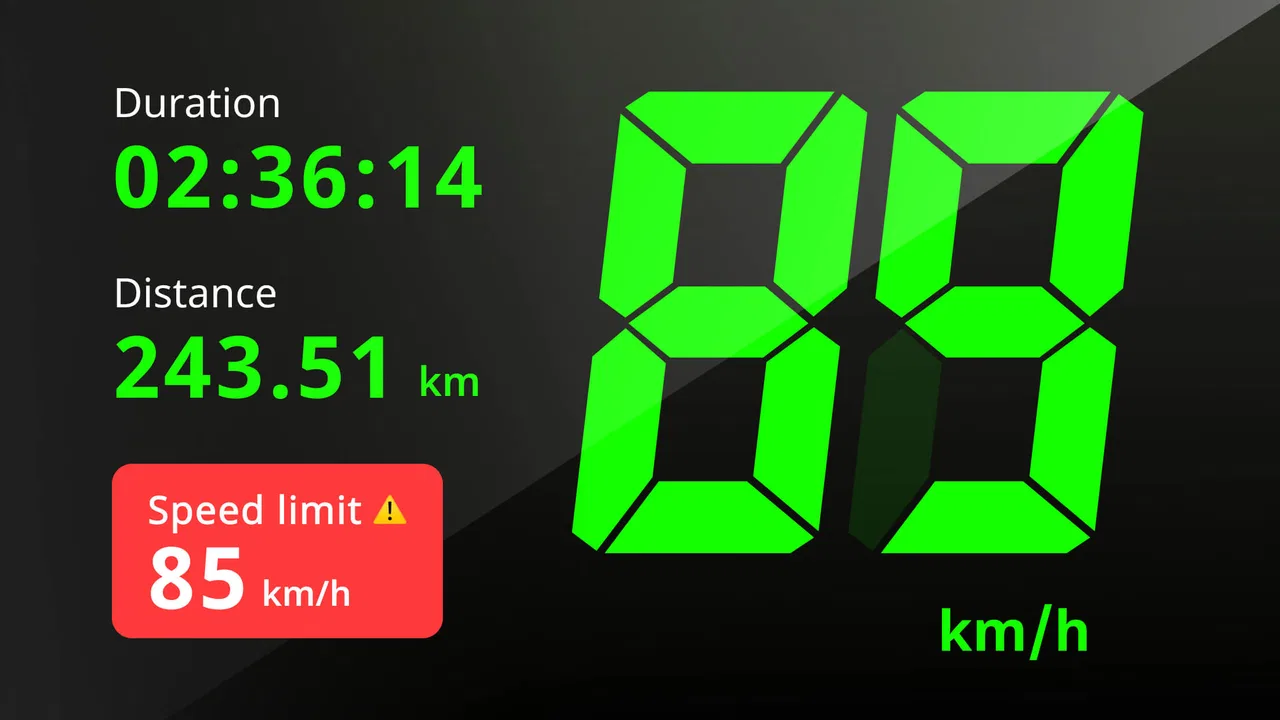
I tested GPS Speedometer & Odometer as a practical driving companion rather than treating it like a replacement for a full navigation service. Its job is narrower and, in some situations, more useful: it turns GPS information into a visible speed and distance readout, with speed-limit checking included in the experience. That focus makes it appealing when I want a quick glance at movement data without planning a route.
The app sits in the Maps & Navigation category and is developed by QR & Barcode Scanner. It is free to install, rated for Everyone, and has reached more than a million installs. Its average score is 4.7 from roughly twenty-two thousand ratings, which suggests that many people find the basic idea dependable enough for regular use. I still think the right question is not simply whether it works, but whether its presentation suits the way you travel, see information, and interact with a phone.
In my experience, the strongest part of this app is its directness. You open it, give it a clear view of the information it presents, and use the screen as a speed reference. That can be handy for a driver who wants a large, dedicated speed display, a cyclist checking pace, or a passenger monitoring distance during a trip. It is less convincing for someone who needs turn-by-turn directions, traffic avoidance, transit planning, or a complete travel record.
You May Also Like

 Blood Strike: 2.5 Anniversary
Blood Strike’s Loadouts Turn Every Drop Into a Tactical Gamble
A close look at Blood Strike’s custom loadouts: how fast access to signature weapons reshapes its battle royale rhythm, rewards preparation, and narrows the gap between fights.

 Pandora - Music & Podcasts
Pandora’s Music Is Easy to Start, but Harder to Recover
Pandora’s strength is its low-effort path from a seed to a station. Its weak spot is how much confidence it asks you to place in connection, setup, and quiet recovery.

 8 Ball Pool
 Is Built on Rivalries, Rematches, and Routine
A close look at the rivalries, rematches, shared routines, and unanswered safety questions that turn a quick pool match into a persistent mobile community.

 Samsung Music
’s Quiet Strength Is Playing What You Already Own
Its reach comes less from spectacle than from dependable access to a personal library. That simplicity is both the app’s strongest retention engine and its ceiling.

 AccuWeather: Weather Radar
AccuWeather Review: A Quick, Clear Forecast for Everyday Decisions
For everyday plans, the best forecast is the one you can understand quickly. AccuWeather makes rain timing, radar, and local conditions easy to act on, with a few trade-offs.

 Hill Climb Racing
Why Hill Climb Racing Still Turns Crashes Into One More Run
A tiny car, a bumpy hill and one more upgrade: Hill Climb Racing keeps resurfacing because its simple chaos makes every near-miss feel personal.
More From Our News Desk



How the display and navigation feel in everyday use
I find the display’s main advantage is that it can keep speed and distance in view without making me scan a full map. In this section, I’ll focus on how to make that simple readout useful without turning it into another distraction, then consider when a dedicated speed display is worth choosing over a navigation app.
A focused screen is easier to understand than a crowded map
Most navigation apps ask me to process several layers at once: a map, route lines, road names, upcoming turns, traffic colors, and controls. GPS Speedometer & Odometer is easier to understand because its purpose is more limited. When I only need to know how fast I am moving or how far I have gone, a dedicated speedometer can reduce the amount of visual searching.
That simplicity matters for readability. A person with limited attention, a tired traveler, or someone who finds complex map interfaces overwhelming may prefer one main measurement over a screen full of competing information. The app’s value is not that it replaces every navigation tool; it is that it can provide a more focused reference when a map would be excessive.
I would still position the phone carefully before moving. A speed display is useful only if it can be read with a short glance, and no app should encourage someone to handle a phone while driving. For a driver, the safest workflow is to set everything up while stopped and then use the app only as a quick visual reference. A passenger can interact with it more freely and may be the better person to monitor distance or speed during a long journey.
What the app does well for people who want quick feedback
The store summary emphasizes measuring and tracking speed and distance while checking the speed limit. That combination gives the app a practical role beyond showing a single live number. I can imagine using it on a road trip when I want a simple sense of progress, or during a ride when the distance reading is more relevant than a route map.
One useful habit is to treat the distance display as an estimate for planning breaks rather than as a precise trip log. GPS readings can vary with reception, surroundings, and movement, so I would not use a phone speedometer as the sole basis for legal, professional, or safety-critical decisions. It is a helpful aid, not a certified measuring instrument.
The current version is 1.1.9, and the app supports devices running Android 7.0 or later. That broad compatibility is helpful for people who keep an older phone as a dedicated dashboard device. It also means the app may be a realistic option for someone who does not want to replace a perfectly usable handset just to run a newer navigation tool.
Navigation clarity depends on the situation
For a familiar commute, the focused approach works well. I already know where I am going, so a map would mostly be decoration. With this app, the phone can serve as a compact speed and distance reference while my attention stays on the road.
On an unfamiliar route, the balance changes. I would choose a conventional navigation app when I need lane guidance, spoken turns, route alternatives, or information about closures. GPS Speedometer & Odometer can complement that kind of app, but it should not be mistaken for a complete navigation system. Its narrow purpose is a strength when I need speed data and a weakness when I need travel instructions.
Motor and sensory considerations
From a motor-access perspective, the app is most comfortable when it is configured before the journey begins. The less often I need to tap, adjust, or reposition the phone while moving, the better. Someone with limited hand movement, tremors, or difficulty making precise touches may find a dedicated speed display easier than a map with many small controls, but the experience still depends on being able to place and secure the device safely.
I would recommend a short stationary test for anyone who has difficulty with touch input. Open the app, check whether the main information is easy to locate, and decide whether the phone can remain visible without repeated adjustments. If the display requires frequent interaction to remain useful, it may not be a good fit for a driver with limited dexterity. A passenger, however, could operate it without the same safety pressure.
For users with low vision, the key question is not just whether the numbers are present, but whether they can be read quickly in the actual environment. Bright daylight, glare, vibration, and a small phone can all reduce clarity. I would test the app in the vehicle or on the bike mount where it will really be used instead of judging it from a calm indoor setup.
People who are sensitive to visual clutter may appreciate the app’s focused purpose. On the other hand, users who need spoken information, strong tactile feedback, or a highly customized visual presentation should be cautious. I would not assume that a large-looking speed readout automatically solves every accessibility need. The app can reduce complexity, but it does not remove the need to verify that its output works for your particular vision, hearing, and motor preferences.
For users with hearing loss, a visual speed display is naturally more useful than an experience that relies mainly on sound. But that does not mean every warning or change will be equally noticeable without audio. If staying under a limit is important, I would build the habit of checking the screen at safe moments rather than depending on an alert I may not perceive.
Situational access: where this app makes sense
A realistic example is a family road trip in an older car. The built-in dashboard may show speed, but a passenger wants to keep an eye on distance traveled and compare progress with planned stops. Instead of handing the driver a phone repeatedly, the passenger can set up this app and monitor the journey from the seat. That arrangement is safer and also makes the distance information more useful because someone has time to interpret it.
Another scenario is a cyclist who wants a simple ride reference without loading a route-planning interface. The app may be attractive for a familiar loop where navigation is already known. I would still mount the phone securely, avoid touching it while riding, and remember that GPS performance can change around tall buildings, dense tree cover, tunnels, or other areas where the signal is less consistent.
It can also help a learner understand the relationship between movement, speed, and distance when supervised by another person. A passenger or instructor can discuss the readings without making the learner operate the phone. That is a more inclusive use than expecting the person controlling the vehicle to watch a screen constantly.
For walking, the app is less obviously necessary because many phones already provide basic location and activity information through other tools. Still, someone who wants a dedicated distance reference on a long walk may prefer its focused presentation. The benefit depends on whether the user values a live speedometer-style view more than route history, step counts, elevation, or social features commonly found in fitness apps.
The free price is a meaningful advantage for occasional users. I can try it without committing to a subscription, which lowers the barrier for someone who only needs it for a trip or a short period. There are in-app purchases ranging from $4.49 to $39.99 per item, so I would review any purchase screen carefully before confirming an upgrade. A person choosing the app specifically because it costs nothing should pay attention to which functions remain comfortable in the free experience.
How it compares with the usual alternatives
Compared with a car’s built-in speedometer, a phone-based display is more portable and can be used in vehicles, on bikes, or as a passenger’s trip reference. The built-in instrument remains the better primary source for a driver because it is already positioned for that purpose and does not depend on a phone screen or GPS reception.
Compared with a full navigation app, this one is less distracting when I only want speed and distance, but much less capable when I need directions. A mapping app is the better choice for unfamiliar streets, spoken guidance, traffic conditions, and route decisions. Using both can be sensible, although two active displays may create more distraction rather than less, so I would keep only the information that genuinely helps.
Compared with a fitness tracker, GPS Speedometer & Odometer is better suited to someone who wants a driving-style speed readout instead of a broader health dashboard. A fitness-focused tool may be preferable for workout history, training goals, heart-rate data, or detailed activity analysis. This app’s appeal is its narrower, more immediate purpose.
Remaining barriers and practical limitations
The biggest limitation is the dependence on GPS conditions. A phone can only estimate movement from the signals and sensors available to it, and the result may not respond perfectly in every environment. I would be especially careful in tunnels, underground areas, between tall buildings, or anywhere the device has trouble maintaining a clear signal. That does not make the app useless; it simply means the reading should be treated as guidance rather than absolute truth.
Speed-limit information also deserves sensible expectations. Road rules can change, signs can be temporary, and local conditions may not always match what a digital tool displays. I would always follow visible road signs and official instructions first. The app can help me stay aware, but it should never override the road itself.
Another barrier is the physical context. A phone that is easy to read at home may be difficult to see through windshield glare. A user with low vision may need a different mounting position, a larger device, or a passenger to monitor the screen. Someone with limited reach may need assistance during setup. These are not failures unique to this app, but they affect whether its otherwise simple interface is genuinely accessible in practice.
There is also a trade-off between minimalism and control. A focused display can be calming, yet users who need extensive customization, detailed history, route exports, or advanced cycling metrics may find it too limited. I would skip it if my main goal were comprehensive trip analysis. I would also skip it as a primary navigation tool if I regularly travel in unfamiliar places.
Because the app is rated for Everyone, it is approachable for a broad audience, including families who want to understand its basic purpose without encountering an age-restricted product. That rating does not guarantee that every person will find the interface accessible, though. Accessibility is personal and situational, so testing the display on the intended device remains important.
My inclusive verdict
GPS Speedometer & Odometer is at its best when a user needs a simple, visible movement reference rather than an all-purpose travel assistant. I like its focused role: it can reduce the visual competition found in map apps, work on older Android phones, and offer useful speed and distance context for drivers, passengers, cyclists, and walkers.
I would recommend it to someone who wants a free starting point for a dedicated GPS speedometer, especially if a passenger can handle setup and monitoring. I would also recommend a careful real-world test for anyone with low vision, limited dexterity, hearing loss, or sensitivity to visual clutter. The app may be easier than a crowded navigation screen, but the phone’s size, mounting position, glare, and GPS conditions still determine whether it is comfortable and safe.
I would choose a traditional navigation app for route guidance, the vehicle’s own instrument for primary driving information, and a fitness app for detailed activity records. In other words, this is not the universal answer, and that is fine. Its usefulness comes from doing a smaller job without asking me to navigate through an entire travel platform.
After using it, my advice is straightforward: set it up while stopped, place the phone where it can be glanced at safely, compare its reading with the vehicle’s instrument, and treat speed-limit information as a reminder rather than an authority. If that matches your needs, the free entry point and focused presentation make it worth trying. If you need spoken guidance, deep customization, or dependable professional-grade measurements, another category of app will serve you better.
For its intended purpose, the app earns its strong reputation with a sensible, accessible idea and a low barrier to entry. Its most inclusive quality is not a special claim or certification, but the fact that it can simplify one task for people who do not want a complicated map. Its main weakness is equally clear: simplicity cannot compensate for poor visibility, weak GPS conditions, or the need for features it was never designed to provide.
That makes my final view positive but measured. I would keep it as a lightweight companion for familiar journeys and passenger-led monitoring, while making sure the person using it can read the display comfortably and does not need to touch the phone in motion. For readers seeking a focused GPS speedometer with distance awareness on Android, GPS Speedometer & Odometer is a practical option, provided its limits fit the trip.
FAQs for GPS Speedometer & Odometer
01What features does the GPS Speedometer & Odometer app offer?
The GPS Speedometer & Odometer app provides users with real-time speed tracking, distance measurement, and route logging. It also includes features like average speed calculation, altitude tracking, and a customizable HUD display. These features are designed to enhance your driving or cycling experience by providing accurate and detailed data.
02How accurate is the GPS Speedometer & Odometer app?
The app leverages your device’s GPS capabilities to provide precise speed and distance measurements. Accuracy can vary depending on GPS signal strength, which may be affected by environmental factors such as weather, terrain, and obstructions like buildings. Generally, users find it reliable for both casual and professional use.
03Is the GPS Speedometer & Odometer app free to use?
The app is available as a free download with basic features accessible at no cost. However, it also offers in-app purchases or a premium version that unlocks additional features such as ad-free usage, advanced data analytics, and enhanced customization options. This allows users to choose the level of functionality they need.
04Does the GPS Speedometer & Odometer app require an internet connection?
The app primarily relies on GPS, which does not require an internet connection. However, some features, like map updates or sharing your trips on social media, may require data connectivity. It is advisable to have an intermittent internet connection for the best user experience, especially for map-related functionalities.
05Can I use the GPS Speedometer & Odometer app for cycling or walking?
Yes, the app is versatile and can be used for various activities including driving, cycling, and walking. It provides accurate metrics tailored to each activity, helping users track their speed, distance, and routes efficiently. This makes it a great tool for fitness enthusiasts looking to monitor their performance.
Pros
- Accurate speed tracking in real-time.
- Simple
- user-friendly interface design.
- Works offline
- no data required.
- Customizable speed units and display.
- Battery-efficient performance.
Cons
- Limited features in free version.
- Ads can be intrusive at times.
- May not support all devices.
- Occasional GPS signal loss.
- No integration with other apps.

GPS Speedometer & Odometer
Gallery